Koppel Outlook met Exact Online
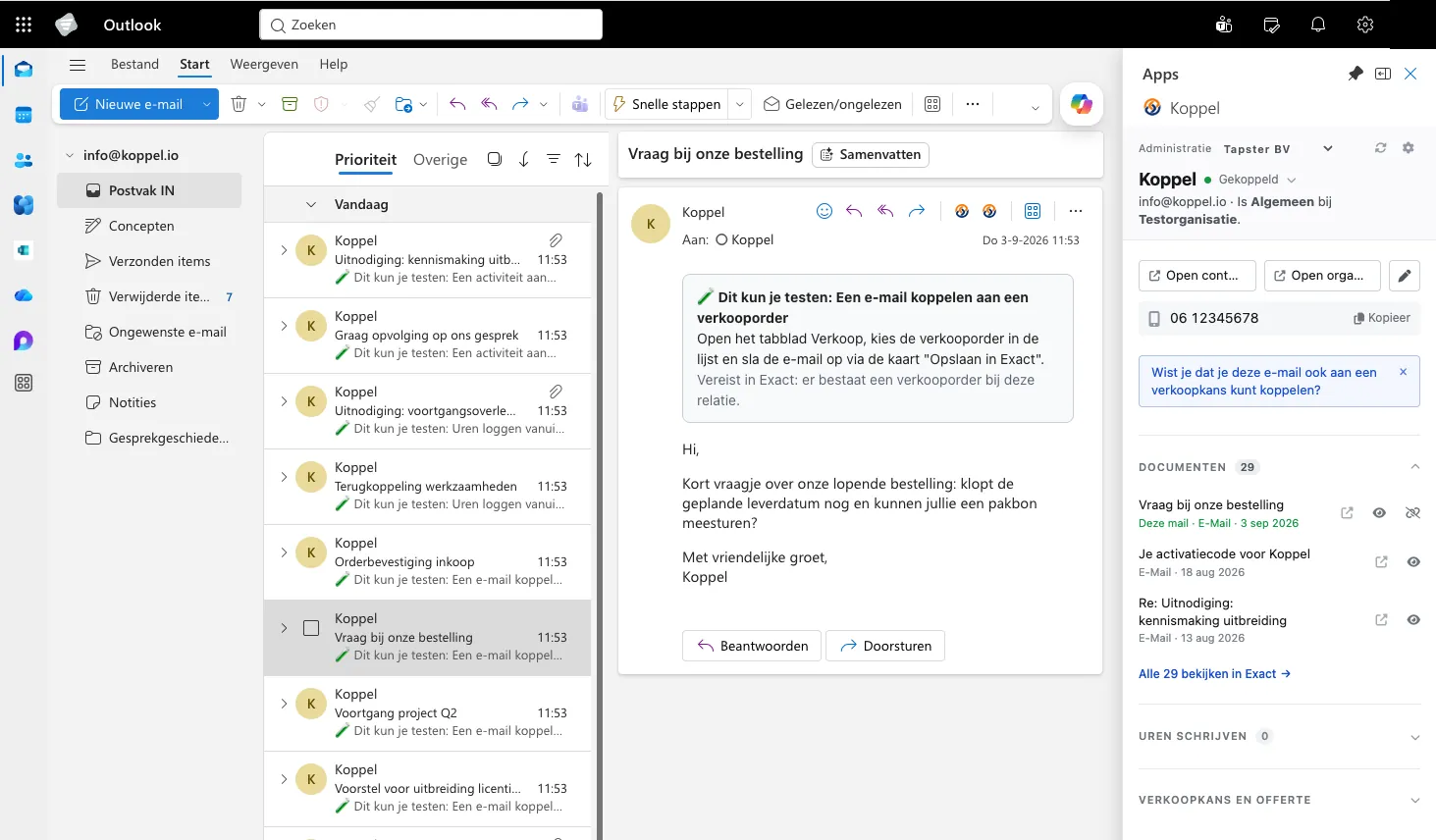
Laat Outlook en Exact Online samenwerken, ook op Premium. Koppel contacten, werk je CRM bij, sla e-mails op, schrijf tijd en update je projecten. Allemaal zonder Outlook te verlaten.
Vanaf €5 per medewerker per maand
30 dagen gratis. Geen betaalgegevens nodig.
Wat kan Koppel?
Contacten matchen en opslaan
Herken automatisch of een e-mailafzender of agendagenodigde al in Exact staat. Zo niet? Sla het contact direct op vanuit Outlook.
E-mails opslaan
Bewaar belangrijke e-mails (inclusief bijlagen) bij de juiste relatie in Exact. Zichtbaar voor het hele team, zonder te schakelen.
Verkoopkansen bijwerken
Bekijk en bewerk verkoopkansen uit Exact direct vanuit je inbox. Je CRM blijft actueel zonder dat je Exact hoeft te openen.
Tijdschrijven vanuit Outlook
Boek uren op projecten vanuit een e-mail of agenda-afspraak. Geen urenlijstje achteraf, gewoon direct vanuit je werkdag.
Contactgegevens inzien
Zie in één oogopslag alle relevante klantinformatie uit Exact wanneer je een e-mail opent. Altijd de juiste context bij de hand.
Geen technische kennis nodig
Je installeert Koppel vanuit de Microsoft Marketplace. Je Exact-beheerder geeft Koppel eenmalig toegang tot je Exact Online-omgeving. Daarna ben je binnen vijf minuten aan de slag.
Zie Koppel in actie

Elf seconden: je opent een mail, Koppel herkent de relatie en zet de gegevens uit Exact Online ernaast.
Liever eerst een persoonlijke demo?
Plan een videogesprek van 30 minuten. We laten Koppel zien in Outlook en beantwoorden al je vragen over de koppeling met Exact Online.
Plan een demoKies zelf een moment dat je uitkomt. Je ontvangt direct een bevestiging met de afspraakgegevens.
Hoe werkt het?
-
Registreer
Vul het formulier in en ontvang je activatiecode per e-mail.
-
Installeer
Installeer de Koppel-plugin vanuit Microsoft Marketplace. Dat werkt hetzelfde op Exact Online en op Exact Online Premium.
Je Exact Online-beheerder voegt Koppel eenmalig toe aan de omgeving. Zonder die stap kan de proefperiode niet starten.
-
Activeer
Voer je activatiecode in, koppel je Exact Online-account en je kunt direct aan de slag.
Hoe gaan we met je data om?
Koppel leest mee in je mailbox en schrijft in Exact Online. Daarom staat hier wat er wel en niet met je gegevens gebeurt.
Koppel is een doorgeefluik
Wat je archiveert, matcht of boekt gaat rechtstreeks naar Exact Online via de Exact-API. Koppel bewaart daar zelf geen kopie van.
Geen wachtwoorden, wel jouw rechten
Je autoriseert Koppel op de inlogpagina van Exact Online zelf (OAuth). Koppel ziet je wachtwoord nooit en kan alleen wat jouw eigen Exact-gebruiker mag. Je trekt de autorisatie op elk moment weer in.
Hosting binnen de EU
Onze servers en databases staan binnen de Europese Unie en al het verkeer loopt over een versleutelde verbinding (TLS). Tapster is ISO 27001-gecertificeerd.
Wat we wel bewaren
Alleen wat nodig is voor je licentie: bedrijfsnaam, naam en e-mailadres van de contactpersoon, en technische referenties. Licentiegegevens tot 12 maanden na beëindiging, factuurgegevens 7 jaar, technische logs maximaal 12 maanden.
Waar je gegevens terechtkomen
Wat je vanuit Outlook vastlegt, beheer je in Exact Online. Daar vind je het terug, en daar pas je het aan of verwijder je het.
- E-mails en bijlagen die je archiveert gaan naar Exact Online, bij de juiste relatie. Koppel bewaart er geen kopie van.
- Contactpersonen die je matcht of aanmaakt staan in Exact Online en in je eigen Outlook, niet ergens daartussenin.
- Uren en verkoopkansen die je boekt komen in Exact Online terecht, op het juiste project of de juiste kans.
- Je inloggegevens van Exact Online blijven bij Exact. Koppel werkt met een token dat je zelf weer kunt intrekken.

Het managementsysteem voor informatiebeveiliging van Tapster is gecertificeerd volgens ISO/IEC 27001.
Het volledige verhaal staat in het privacy statement en de algemene voorwaarden. Vragen over gegevensverwerking of een verwerkersovereenkomst? Mail privacy@tapster.nl.
Tarieven
Start met een gratis proefperiode van 30 dagen. Daarna betaal je per medewerker die de plugin gebruikt.
| Medewerkers | Prijs per medewerker/maand |
|---|---|
| 1 – 5 | €5,00 |
| 6 – 20 | €4,00 |
| 21 en meer | €3,00 |
Eén medewerker die de plugin gebruikt telt als één activatie. Je betaalt alleen voor medewerkers die de plugin ook echt gebruiken.
Bereken je prijs
per maand
Alle bedragen zijn exclusief btw.
- Alle prijzen excl. btw.
- Maandelijks opzegbaar.
- Elke maand berekenen we het tarief opnieuw op basis van het actuele aantal activaties.
Start met Koppel
Vul het formulier in en ontvang je activatiecode per e-mail.
Adviseer of implementeer je Exact Online?
Werk je als Exact Online-partner of consultant en wil je Koppel bij je klanten inzetten? We ondersteunen partners bij de uitrol en maken graag aparte afspraken over tarieven en begeleiding.
Of bel 026 47 233 41.
Veelgestelde vragen
Prijs en proefperiode
Wat kost Koppel?
€5 per medewerker per maand voor de eerste 5 activaties, €4 voor nummer 6 tot en met 20 en €3 voor elke volgende. Je betaalt alleen voor medewerkers die de plugin daadwerkelijk gebruiken. Heeft je organisatie bijvoorbeeld 5 Exact Online-gebruikers maar activeren er maar 2 de plugin? Dan betaal je voor 2 activaties. Alle prijzen zijn excl. btw en worden maandelijks gefactureerd.
Kan ik het eerst proberen?
Ja, je krijgt 30 dagen gratis en onbeperkt toegang tot alle functies. Geen betaalgegevens nodig bij registratie.
Wat gebeurt er na de trial?
Na 30 dagen stopt de plugin automatisch. Je kunt dan direct een abonnement afsluiten op koppel.io. Geen verborgen kosten, geen automatische verlenging van de trial.
Wat is een activatie precies?
Een medewerker die de plugin gebruikt telt als een activatie. Zodra iemand de plugin in Outlook opent en inlogt op Exact Online, telt dat als een activatie. Je betaalt alleen voor die plekken, niet voor het totale aantal Exact Online-gebruikers in je organisatie. De eerste activatie zet de organisatie-licentie neer; collega's in dezelfde Microsoft-omgeving krijgen automatisch een eigen activatie zodra ze de plugin starten. Wanneer een medewerker de plugin drie maanden niet heeft gebruikt, wordt de activatie automatisch op inactief gezet (de organisatie-beheerder krijgt hiervan bericht) en telt deze niet meer mee bij een verlenging. Opent de medewerker de plugin later opnieuw, dan wordt de activatie automatisch weer actief. Per medewerker kan er maximaal één activatie geregistreerd worden.
Installatie en beheer
Hoe snel ben ik aan de slag?
Binnen vijf minuten. Je registreert, installeert de plugin via Microsoft Marketplace, koppelt Exact Online en je kunt aan de slag.
Heb ik een Exact Online beheerder nodig?
Alleen voor het eenmalig toevoegen van Koppel aan je Exact Online-omgeving. Dat doet een beheerder. Daarna kan iedere gebruiker zelf de koppeling met zijn eigen Exact-account leggen.
Moeten al mijn collega's de plugin apart installeren?
Installeren wel, maar activeren niet. De eerste gebruiker activeert de organisatie-key. Alle collega's binnen dezelfde Microsoft-omgeving krijgen daarna automatisch toegang.
Kan één medewerker de plugin op meerdere apparaten gebruiken?
Ja. Een activatie is gekoppeld aan de medewerker, niet aan een specifiek apparaat. Zodra je met je Microsoft-account inlogt in Outlook op een ander apparaat, is de plugin daar ook beschikbaar. Je gebruikt dezelfde activatie op al je apparaten, opnieuw activeren is niet nodig.
Staat Koppel in de Microsoft Marketplace?
Ja, Koppel is officieel gepubliceerd in de Microsoft Marketplace. Je kunt de vermelding rechtstreeks bekijken op Microsoft Marketplace en de plugin van daaruit installeren in Outlook. Onze vermelding wordt door Microsoft regelmatig gevalideerd op werking, veiligheid en privacy.
Security en data
Bewaart Koppel kopieën van mijn e-mails?
Nee. Koppel zet e-mails, contacten en uren op jouw verzoek rechtstreeks door naar Exact Online en bewaart daar zelf geen kopie van. De inhoud staat in Exact, onder beheer van je eigen organisatie.
Krijgt Koppel mijn Exact-wachtwoord te zien?
Nee. Je autoriseert Koppel op de inlogpagina van Exact Online zelf (OAuth). Koppel krijgt daarna een token en nooit je wachtwoord. Je kunt die autorisatie op elk moment intrekken in Exact.
Waar staan mijn gegevens?
Onze servers en databases staan binnen de Europese Unie. Al het verkeer loopt over een versleutelde verbinding en Tapster is ISO 27001-gecertificeerd.
Welke gegevens bewaart Koppel wel?
Alleen wat nodig is voor je licentie: bedrijfsnaam, naam en e-mailadres van de contactpersoon, en technische referenties waarmee we bijvoorbeeld herkennen of een e-mail al gearchiveerd is. Licentiegegevens bewaren we tot maximaal 12 maanden na beëindiging, factuurgegevens 7 jaar.
Product en gebruik
Wat is Koppel?
Koppel is een Outlook-plugin die je e-mail koppelt aan Exact Online. Je beheert contacten en verkoopkansen, slaat e-mails op en schrijft uren. Allemaal vanuit Outlook, zonder te schakelen.
Voor wie is Koppel bedoeld?
Voor elke organisatie die werkt met Exact Online en Outlook. Koppel ondersteunt de standaard edities (Boekhouden, Handel, CRM, Productie, Bouw en Projectadministratie) en de Premium edities (Boekhouden Premium, Handel Premium, Productie Premium en Projecten Premium). Van zzp'er tot organisaties met honderd medewerkers.
Wat kan ik ermee?
Vier dingen: contactpersonen matchen en opslaan in Exact, verkoopkansen bijwerken vanuit je inbox, e-mails opslaan bij de juiste relatie, en uren boeken vanuit e-mails en agenda-afspraken.
Waarom zou ik e-mails opslaan in Exact?
Omdat belangrijke afspraken, offertes en klantcommunicatie nu vastzitten in individuele mailboxen. Met Koppel leg je ze vast bij de juiste relatie, zichtbaar voor het hele team. Geen "kun je die mail even doorsturen" meer.
Hoe helpt Koppel bij mijn CRM?
Je ziet direct in Outlook de verkoopkansen en contactgegevens uit Exact. Je werkt ze bij zonder Exact te openen. Zo blijft je CRM actueel zonder extra werk, gewoon vanuit je dagelijkse workflow.
Klaar om Outlook en Exact te koppelen?
Vraag je activatiecode aan en werk vandaag nog vanuit één scherm.
30 dagen gratis, geen betaalgegevens nodig.