Connect Outlook with Exact Online
Link Outlook to Exact Online, Premium included. Manage contacts, CRM, save emails, log time and track projects straight from your inbox.
From €5 per employee per month
Free for 30 days. No payment details required.
What can Koppel do?
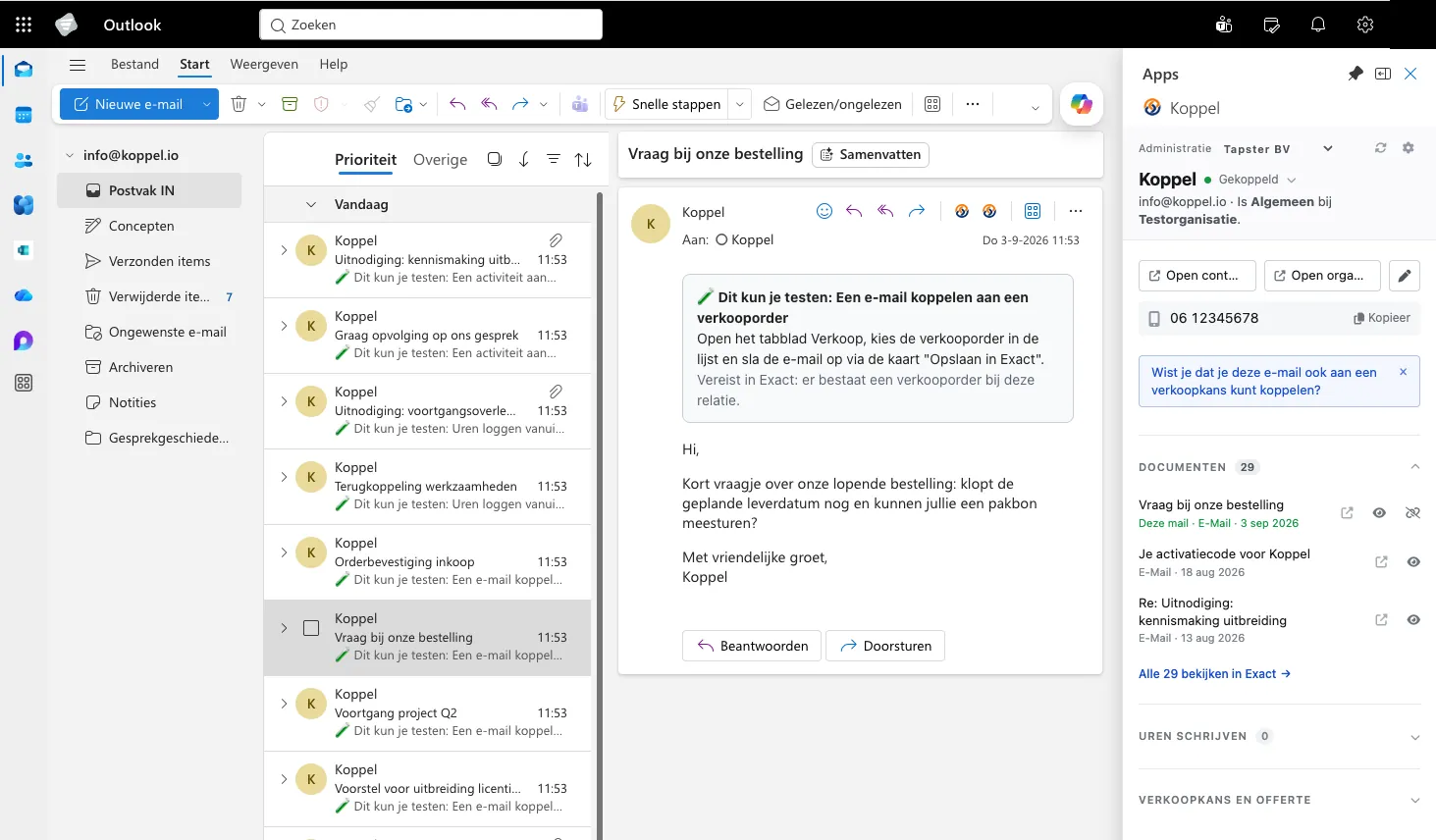
Match and save contacts
Automatically recognise whether an email sender or meeting invitee already exists in Exact. If not, save the contact straight from Outlook.
Save emails
Store important emails (including attachments) with the right relation in Exact. Visible to the entire team, without switching apps.
Update sales opportunities
View and edit Exact sales opportunities directly from your inbox. Keep your CRM up to date without opening Exact.
Log time from Outlook
Book hours on projects from an email or calendar item. No more retrospective time sheets — just log time as you work.
View contact details
See all relevant Exact customer information at a glance whenever you open an email. The right context is always at hand.
No technical skills required
You install Koppel from the Microsoft Marketplace. Your Exact admin grants Koppel one-off access to your Exact Online environment. After that you are up and running in five minutes.

See Koppel in action
Eleven seconds: you open an email, Koppel recognises the relation and puts the Exact Online data next to it.
Prefer a personal demo first?
Book a 30 minute video call. We will show you Koppel in Outlook and answer all your questions about the Exact Online integration.
Book a demoPick a time that suits you. You will receive an instant confirmation with the meeting details.
How does it work?
-
Register
Fill in the form and receive your activation code by email.
-
Install
Install the Koppel plugin from Microsoft Marketplace. That works the same on Exact Online and on Exact Online Premium.
Your Exact Online administrator adds Koppel to the environment once. Without that step the trial cannot start.
-
Activate
Enter your activation code, connect your Exact Online account and you are ready to go.
How do we handle your data?
Koppel reads along in your mailbox and writes to Exact Online. So here is what does and does not happen to your data.
Koppel is a pass-through
Whatever you archive, match or book goes straight to Exact Online through the Exact API. Koppel keeps no copy of it.
No passwords, your permissions
You authorise Koppel on the Exact Online sign-in page itself (OAuth). Koppel never sees your password and can only do what your own Exact user is allowed to do. You can revoke that authorisation at any time.
Hosted inside the EU
Our servers and databases are hosted inside the European Union and all traffic runs over an encrypted connection (TLS). Tapster is ISO 27001 certified.
What we do keep
Only what your licence needs: company name, name and email address of the contact person, and technical references. Licence data up to 12 months after termination, invoicing data 7 years, technical logs 12 months at most.
Where your data ends up
Whatever you file from Outlook is managed in Exact Online. That is where you find it back, and where you edit or delete it.
- Emails and attachments you archive go to Exact Online, filed under the right relation. Koppel keeps no copy.
- Contacts you match or create live in Exact Online and in your own Outlook, not somewhere in between.
- Hours and opportunities you log end up in Exact Online, on the right project or the right opportunity.
- Your Exact Online sign-in details stay with Exact. Koppel works with a token that you can revoke yourself.

Tapster's information security management system is certified to ISO/IEC 27001.
The full story is in the privacy statement and the terms and conditions. Questions about data processing or a data processing agreement? Email privacy@tapster.nl.
Pricing
Start with a free 30-day trial. Afterwards you pay per employee who uses the plugin.
| Employees | Price per employee/month |
|---|---|
| 1 – 5 | €5.00 |
| 6 – 20 | €4.00 |
| 21 and up | €3.00 |
One employee using the plugin counts as one activation. You only pay for employees who actually use it.
Calculate your price
per month
All amounts exclude VAT.
- All prices exclude VAT.
- Cancel monthly.
- Each month we recalculate the price based on your current number of activations.
Get started with Koppel
Fill in the form and receive your activation code by email.
Do you advise on or implement Exact Online?
Are you an Exact Online partner or consultant who wants to roll out Koppel for clients? We support partners with the rollout and are happy to make separate arrangements on pricing and guidance.
Or call +31 26 47 233 41.
Frequently asked questions
Pricing and trial
What does Koppel cost?
€5 per employee per month for the first 5 activations, €4 for numbers 6 through 20 and €3 for each additional one. You only pay for employees who actually use the plugin. If your organisation has 5 Exact Online users but only 2 activate the plugin, you pay for 2 activations. All prices exclude VAT and are billed monthly.
Can I try it first?
Yes, you get 30 days of free, unlimited access to every feature. No payment details required at registration.
What happens after the trial?
After 30 days the plugin stops automatically. You can then subscribe on koppel.io. No hidden costs, no automatic trial extension.
What exactly is an activation?
An activation is a license seat for one employee who actively uses the plugin. The moment someone opens the plugin in Outlook and signs in, that counts as one activation. You only pay for those seats, not for your total number of Exact Online users. The first activation sets up the organisation licence; colleagues within the same Microsoft environment automatically receive their own activation once they start the plugin. If an employee does not use the plugin for three months, the activation is automatically set to inactive (the organisation administrator is notified) and no longer counts towards a renewal. The activation becomes active again automatically as soon as the employee reopens the plugin.
Installation and administration
How quickly can I get started?
Within five minutes. You register, install the plugin via Microsoft Marketplace, connect Exact Online and you are ready to go.
Do I need an Exact Online administrator?
Only to add Koppel to your Exact Online environment once. An admin does that. After that, every user can set up their own link with their own Exact account.
Do all my colleagues need to install the plugin separately?
Installing, yes; activating, no. The first user activates the organisation key. All colleagues within the same Microsoft environment automatically get access afterwards.
Can one employee use the plugin on multiple devices?
Yes. An activation is tied to the employee, not to a specific device. Once you sign in with your Microsoft account in Outlook on another device, the plugin is available there too. You use the same activation across all your devices, no need to activate again.
Is Koppel listed on Microsoft Marketplace?
Yes, Koppel is officially published on Microsoft Marketplace. You can view the listing directly on Microsoft Marketplace and install the plugin into Outlook from there. Microsoft regularly validates our listing on functionality, security and privacy.
Security and data
Does Koppel keep copies of my emails?
No. At your request Koppel passes emails, contacts and hours straight through to Exact Online and keeps no copy. The content lives in Exact, managed by your own organisation.
Does Koppel see my Exact password?
No. You authorise Koppel on the Exact Online sign-in page itself (OAuth). Koppel then receives a token and never your password. You can revoke that authorisation in Exact at any time.
Where is my data held?
Our servers and databases are inside the European Union. All traffic runs over an encrypted connection and Tapster is ISO 27001 certified.
What data does Koppel keep?
Only what your licence needs: company name, the contact person’s name and email address, and technical references we use to recognise whether an email has already been archived. We keep licence data for up to 12 months after termination and invoicing data for 7 years.
Product and usage
What is Koppel?
Koppel is an Outlook plugin that connects your email to Exact Online. Manage contacts and opportunities, save emails and log hours — all from Outlook, without switching apps.
Who is Koppel for?
For any organisation that uses Exact Online and Outlook. Koppel supports the standard editions (Accounting, Trade, CRM, Manufacturing, Construction and Project Administration) and the Premium editions (Accounting Premium, Trade Premium, Manufacturing Premium and Projects Premium). From freelancer to organisations with a hundred employees.
What can I do with it?
Four things: match and save contacts in Exact, update sales opportunities from your inbox, save emails on the right relation, and log hours from emails and calendar items.
Why save emails in Exact?
Because important agreements, quotes and customer communication are currently locked in individual mailboxes. With Koppel you store them on the right relation, visible to the whole team. No more "can you forward me that email?"
How does Koppel help my CRM?
You see Exact sales opportunities and contact details directly in Outlook. You update them without opening Exact. Your CRM stays current without extra work, as part of your daily workflow.
Ready to connect Outlook and Exact?
Request your activation code and work from a single screen today.
Free for 30 days, no payment details required.